
More profit. More customers.Better every month.
Priorita makes growth operable: profit and customer targets per area, metrics reviewed every week, and an improvement cycle that doesn't depend on memory or on how the team happens to feel.
14-day trial · no card to get started · English, Spanish and Portuguese
On target
87%
Improvements on track
42/48
Overdue
6
Areas
Improvements on track
Next council
Operations committee · Thursday 9:00
Three things your company has to move
Priorita is not a calendar or a task manager. It is the system that keeps the three levers your growth depends on under control.
More profit
Margin, receivables and costs stop being a month-end review. Every area gets a profitability target and a metric, and deviations show up while they can still be corrected.
- Days sales outstanding, with a target
- Margin and cost per area
- Alerts when a number leaves its range
More customers
Commercial growth is managed by process, not by outcome: quotes, conversion, new customers and repeat purchase. You see where the funnel breaks before revenue does.
- Conversion rate and sales cycle
- New customers and repeat purchase
- Client record with history and interactions
Continuous improvement
Every week you review what is off target, decide one concrete improvement and someone owns it with a date. Next month you measure whether it worked. That is the cycle, and it is what compounds.
- Weekly review-and-decide cycle
- Improvements with an owner, a date and a result
- History, so you know what worked and what didn't
The cycle that grows the company
Four steps that repeat every week. None of them is new; the hard part is keeping them connected. That is exactly what Priorita does.
Where you are going to grow
Nine business areas, each with an owner and a target: profit, sales, customers, operations, speed, quality, people, growth and execution. Without a target there is no improvement, only activity.
The numbers that matter
A handful of metrics per area, with target and traffic light. The goal is not a pretty dashboard: it is catching the deviation while it is still cheap to fix.
Meetings where something is decided
Councils and committees with a fixed agenda: read the numbers, discuss what is red, agree the improvement. What remains is the minutes, not a feeling about the meeting.
The decision gets executed, then measured again
Every agreement leaves with an owner and a date, and an automatic reminder. Next week the cycle opens by checking whether the number moved. That is continuous improvement, not an annual plan.
A walk through Priorita, screen by screen
Everything below is a capture of the running platform, not a mockup. This is what the growth cycle looks like once it is operating.
The whole business in one picture
The executive dashboard answers one question: is the company improving? Nine areas with their traffic light, metrics off target, overdue improvements and objectives at risk.
See the product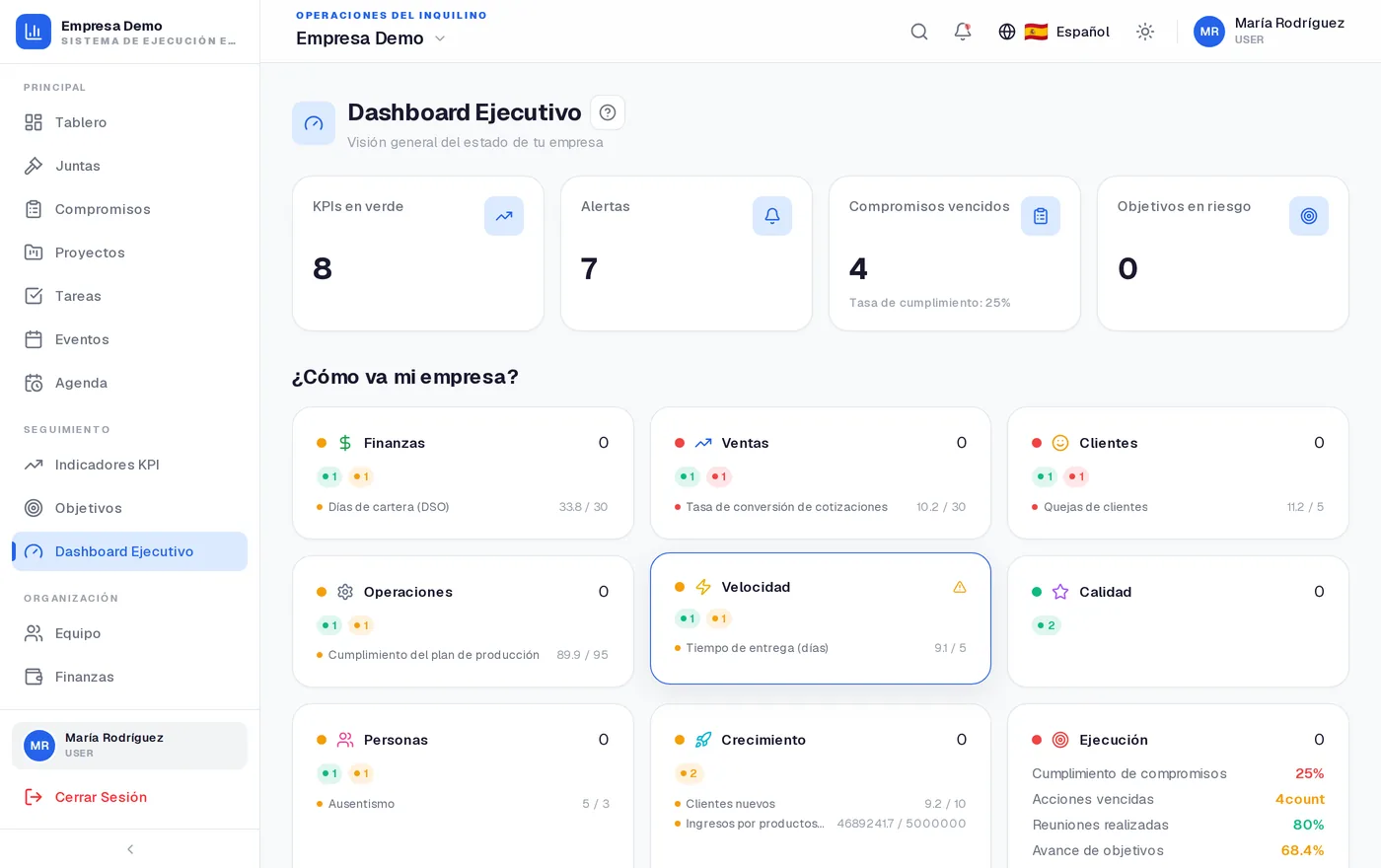
Everything the cycle needs, in one place
Modules included with the platform that your team switches on as it goes.
Councils and committees
Recurring meetings with agenda, attendance, topics covered and minutes. Categories and locations per council.
Commitments
The backbone of the system: owner, due date, status and a trail back to the meeting that created it.
KPIs
Metrics per area with target, history and trend. Off-range indicators surface at a glance.
Objectives and OKRs
Objectives per area with measurable key results and progress that is calculated, not hand-guessed.
Executive dashboard
The leadership view: health by area, compliance, delays and what needs a decision this week.
Projects
Initiatives with phases, owners and tasks, tied to the area and objective they serve.
Tasks
Day-to-day work with priority and due date, kept separate from council commitments.
Agenda and events
Calendar of councils, events and due dates, plus a personal agenda for each member.
Team and roles
Users, positions, groups and per-module permissions. Everyone sees what belongs to them.
Clients (360 CRM)
Client record with timeline, logged interactions, tags and lifecycle stage.
Sales
Opportunities and quotes connected to the client and to the commercial KPIs of the Sales area.
Finance
Financial tracking for the period, feeding the indicators of the Finance area.
Resources
Library of documents, templates and reference material for the team.
Locations
Multi-site operations: councils, teams and indicators attached to each location.
Already running EOS (Traction)? It is all here.
If your organization runs on the Entrepreneurial Operating System, Priorita turns on the EOS module and the screens show up exactly as you know them, with the method's own terminology. If you don't run EOS, those screens never appear.
The framework is set per organization. Teams that don't use EOS work with councils, commitments and KPIs.
Your industry, configured on day one
Pick a pack when you create the organization and Priorita seeds areas, councils, positions, groups, KPIs and your sector's terminology. You can change any of it afterwards.
Yours not listed? Start with "Company / organization" and rename entities to your own vocabulary.
The details that keep the cycle alive
A growth system only works if the team opens it every week.
Follow-up over WhatsApp
Agreed improvements notify their owner over WhatsApp and email using approved templates. Available from the Professional plan.
Your vocabulary, not ours
Rename councils, commitments, locations or positions to the words your organization already uses. The whole platform follows.
Roles and data scope
Permissions per module and per role. Members see only their own work; leadership sees the whole picture.
English, Spanish and Portuguese
Each person picks their language. The same organization can operate in several at once.
Isolated organizations
Every organization has its own data, branding and logo. Nothing crosses between organizations.
Audit trail
A record of who changed what and when, for the decisions that matter.
Local payments
Subscriptions in COP through MercadoPago, Wompi, ePayco or PayU, with USD billing when needed.
Data-protection consent
Consent flow with acceptance records for personal-data processing (Colombian Law 1581).
Straightforward plans
Every plan includes targets per area, metrics, councils and the executive dashboard. Limits and support are what change.
Starter
Small teams getting started
- 10 users
- 25 KPIs · 100 tasks
- Councils and commitments
- Execution dashboard
- Email support
Professional
Companies running several areas
- 50 users
- 100 KPIs · 500 tasks
- OKRs and objectives per area
- Executive reports
- WhatsApp reminders
- Priority support
Enterprise
Multi-area or multi-site organizations
- Unlimited users
- Unlimited KPIs and tasks
- Advanced multi-area OKRs
- Custom reports
- API access
- Dedicated support + SLA
14-day trial on paid plans. Prices in COP and USD.
Growth, metrics and business in Colombia
Qué es un KPI, explicado desde cero (y cómo se define uno que sirva)
KPI significa «indicador clave de desempeño». Suena grande y es una idea sencilla: un número, con un dueño y una meta, que le dice si algo va bien antes de que sea tarde. Aquí está todo, sin dar nada por sabido.
8 min readOKR y KPI: qué es cada uno, en qué se diferencian y cuándo usar cuál
Se confunden todo el tiempo y sirven para cosas distintas. Un KPI vigila que el negocio siga funcionando; un OKR empuja a que cambie. Explicado con ejemplos y sin suponer que usted ya sabe qué significan las siglas.
7 min readLos seis números financieros que todo dueño de empresa debería saber leer
Utilidad, margen, flujo de caja, días de cartera, punto de equilibrio y capital de trabajo. Qué significa cada uno, cómo se calcula con una calculadora y por qué una empresa rentable puede quedarse sin plata.
9 min readFrequently asked questions
No. A task manager organizes work; Priorita organizes improvement: targets per area, metrics with a traffic light, meetings where something is decided, and follow-through on whether the number moved. Tasks are the last mile, not the point.
Next quarter can end differently
Set targets per area, read the numbers once a week, and leave every improvement with an owner and a date. That is the whole method.